New customer onboarding 🪴
Check if a new Legion stamp in the customer's region needs to be deployed
High level tasks
- Create a new org
- Discuss security requirements with the customer
- (Optional) Enable SSO
Create a new org
- Go to the mgmt console:
- Production org: https://usw2.legionsecurity.ai/mgmt/organization (west-us-2)
- Dev org: http://localhost/mgmt/organization
- Create a new organization
- Set org name to the customer's name
- Set domain (used to fetch the customer's logo). If not needed, enter a single space character.
- Add the correct backend url according to the customer's selected region (in dev, use the localhost region already provided in the dropdown)
- Add the list of admins to invite to the org
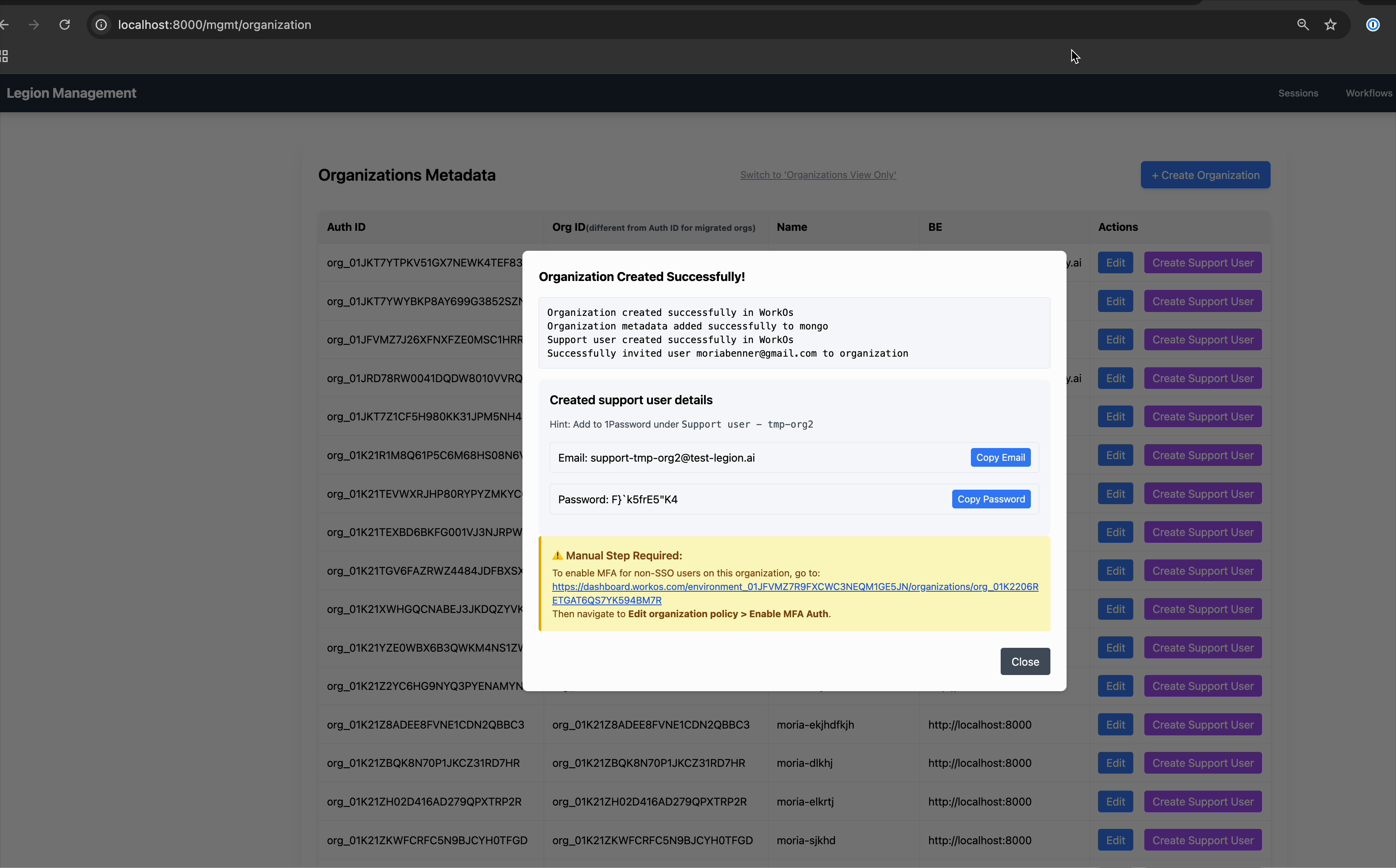
- Copy the new created support user email and password to 1Password
- Save it under 'Dev' vault
- The name of the saved credential should be in format
Support user - <customer name>. - If customer organization requires 2FA, make sure to also save the TOTP secret in 1Password
- Enable MFA for the non-sso users in the org in WorkOS dashboard (follow the link presented in the mgmt console)
- Go to
https://dashboard.workos.com/environment_01JFVMZ7R9FXCWC3NEQM1GE5JN/organizations/{ORG_ID} - Edit organization policy, enabl MFA for non-sso users
- Go to
Watch the demo of creating a new organization:
After organization is in place
- Sign in with the internal support user to the webapp to verify the configuration
- If not done during the org creation step, invite users to the organization via Legion Webapp: Settings > Team members > Add user
Notice: all users are added withmemberrole by default. The first user to accept the invite will be promoted toadminrole automatically. This user can promote other users toadminrole as well.
Discuss security requirements with the customer
As part of POV preparation or when scoping POV requirements, cover the following with the customer:
- SSO: Recommend enabling SSO for secure login. This also addresses most conditional access requirements.
- Conditional access: Ask whether they need restrictions such as IP allow lists or access limited to company-managed devices. These are typically solved by enabling SSO.
Enable SSO
In the WorkOS dashboard (https://dashboard.workos.com/) go to the org page and configure:
-
Add the organization's domain (use the customer's primary email domain, e.g.,
acme.com):- Organization → Settings tab → Edit Organization details → Domain
-
Make sure domain policy is disabled (important):
- Organization -> Features tab -> Domain Policy → Edit policy → Remove the organization's domain if it is there
- Why: After adding a verified domain for an organization, it automatically creates a domain policy for that domain (if not already exists). It is important to disable it, since it might cause an unexpected behavior for different organizations that have the same verified domain.
-
Require users with verified domain to use SSO in order to log in the organization:
- Organization -> Features tab -> Organization Policy → Edit policy → Single Sign-On -> Enable
Require members with verified email domains to sign in with this organization's Single Sign-On connection.
- Organization -> Features tab -> Organization Policy → Edit policy → Single Sign-On -> Enable
-
Invite the organization admin to set up SSO:
- Organization → Features tab → Invite an IT contact to set up this organization
- When configuring the invite, select only "Single Sign-On" (we already set the domain manually in step 1).
-
Customer admin completes SSO configuration in their IdP: The organization admin receives the WorkOS admin portal invite and uses it to connect their identity provider (Okta, Entra ID, Google Workspace, etc.). They will:
- Select their IdP from the WorkOS admin portal
- Follow the IdP-specific setup steps (creating a SAML/OIDC app, mapping attributes, assigning users/groups)
- Confirm the connection is active in the admin portal
Once complete, verify on the Legion Security side that the SSO connection shows as active.
Enable Directory Sync
Configure Directory Sync only after verifying the organization's domain and enabling SSO.
Before setting up Directory Sync, make sure that at least one admin user exists in the organization. After Directory Sync is configured, we will not be able to create new users or change user roles manually.
In the WorkOS dashboard (https://dashboard.workos.com/) go to the org page and configure:
-
Disable Just-in-time provisioning
- Organization → Features tab → Just-in-time provisioning → Disable
-
Invite the organization admin to set up Directory Sync:
- Organization → Features tab → Invite an IT contact to set up this organization
- When configuring the invite, select only "Directory Sync"
-
Customer admin completes SSO configuration in their IdP: The organization admin receives the WorkOS admin portal invite and uses it to connect their identity provider (Okta, Entra ID, Google Workspace, etc.). They will:
- Select their IdP from the WorkOS admin portal
- Follow the IdP-specific setup steps
- Confirm the connection is active in the admin portal
Once complete, verify on the Legion Security webapp that the Directory Sync is configured (in the "Team Members" settings page).
-
Configure group-to-role mapping:
An admin user can configure the mapping in the Legion Security webapp:
- Team Members → Directory Sync (in the top-right corner) → Group Mapping