WorkOS Authentication
WorkOS
WorkOS is a developer platform that provides enterprise-grade authentication, authorization, and other integration APIs to simplify building secure applications.
WorkOS Management API WorkOS Dashboard
Environments
- Staging: Used for local, dev and preview
- Production: Used for production and staging
Organizations
Metadata
- Each organization has metadata in the format
be=<BE_URL>andwa=<WEBAPP_URL>. beis the URL for the backend server the extension/webapp will use for api callswais the url of the webapp for this customer, used in the extension to set the link for recorded session view
In WorkOS we currently can't store metadata and send it over with the token, so we store this data in mongo in
organizations collection. We have mgmt view in Legion BE to add organization metadata in /mgmt/organization, as well as a support user.
Then, both the webapp and extension have a first call to a const BE from which the actual BE url
to use if fetched. This is done in the api /organization/{org_id}.
The process of adding a new customer (org):
Authentication Flow:
- Method: Authorization Code Flow with Proof Key for Code Exchange (PKCE).
- Reason for PKCE: Client secrets cannot be securely stored in the extension.
The Authorization Code Flow with Proof Key for Code Exchange (PKCE) enhances security for public clients (like mobile or single-page applications) by requiring a dynamically generated code verifier. This verifier is used along with the authorization code to obtain access tokens, preventing interception attacks.
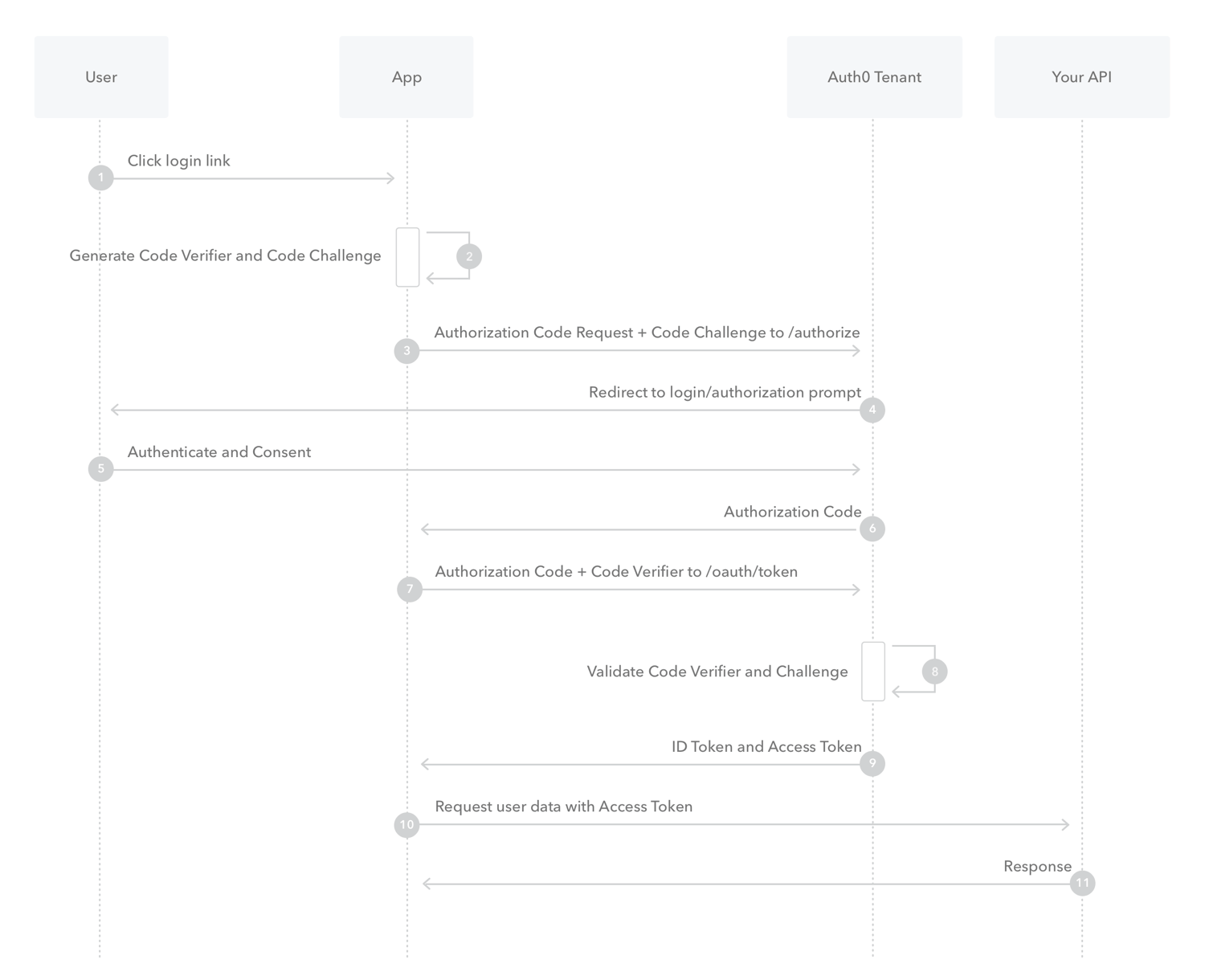 For more details, visit the WorkOS PKCE Article.
Implementation Details:
- Chrome's
chrome.identityAPI is utilized. - Authentication Process:
- Login: Uses
launchWebAuthFlowto open the Auth0 login page. - Redirect URL: Uses
getRedirectURLwhich is formatted ashttps://<extension_id>.chromiumapp.org. - WorkOS Configuration: Redirect URLs, callback URLs, etc., are all configured using the extension's URL format.
- Login: Uses
Login Result:
- Access Token: Used to send to the backend API as an authorization header. The backend verifies this access token.
- ID Token: Contains user details, name etc.
- Refresh Token: Used periodically (and ad hoc) to refresh the tokens.
More Implementation Details:
- Side Panel: Utilizes authentication functions to manage user sessions. Stores the tokens in recoil (and also update the storage if needed) and use them for api calls to api server.
- Background Script: Implements token refresh periodically and session management in the background. Use the access token for api calls to api server. Stores the tokens in the storage and sends a token update msg to the side panel to update the recoil states.
- Content Script: If needed should use util func to get tokens and refresh (if needed) and send back msg to side panel to update state.
- Store Tokens:
Access tokenand itsexpiration timeare stored in the extension's session storage, whilerefresh tokenis stored in local storage.
Authentication in the API Server
Each API request must include an Authorization header in the format Bearer <base64_jwt_access_token>. The access token is verified by fetching public keys from the WorkOS, from staging/prod tenant according to configuration in .env files.
This verification ensures that the token is correctly signed and that its expiration is valid.
As we migrated from Auth0 to WorkOS, BE verifies tokens from WorkOS as well as from Auth0 to support users who still use an older extension version.
Authentication in the Webapp
Authentication Flow:
- Method: Authorization Code Flow with Client Secret.
- Client Secret The Client Secret is stored on NextJs Backend.
Implementation Details:
- WorkOS sdk: authkit-nextjs. Handles session management and token retrieval.
- Environment Variables The following variable are used:
WORKOS_CLIENT_ID=''''
WORKOS_API_HOSTNAME=auth.legionsecurity.ai
WORKOS_COOKIE_PASSWORD=''
WORKOS_API_KEY=''
NEXT_PUBLIC_WORKOS_REDIRECT_URI=''
NEXT_PUBLIC_BE_BASE_URL='' # this is the const first BE we call to fetch org data, and from that point we call to the be from org data
- MiddleWare Handle WorkOS authentication cookie and refresh (using authkit()) and calls to Legion's BE to fetch organization info. Organization info is stored in a cookie as well as the workos authentication tokens (Access/Id/Refresh).
- Protected Api Calls We have
ProtectedSessionProviderthat allows the hookuseProtectedSessionwhich provides a valid session (with token, org info etc).
Environments Matrix
Gotchas
- As the extension has no staging environment, staging organization id is hard coded and when user logs in to extension with a user from this org the extension calls Legion's staging BE.
- To support organization who were migrated from Auth0, we have a hard coded map in code from Auth0 org id to WorkOS org id